
PhilHealth Portal Login, Registration, Contribution Table & ID Card
PhilHealth made simple for 2026 – register, log in, and pay your contributions without the guesswork. Everything you need, from your first PIN to your printed ID card.
PhilHealth is the Philippine Health Insurance Corporation, the state-run agency that helps Filipinos pay for hospital and outpatient care. If you need to register, recover your PIN, log in to the member portal, pay your monthly contribution, or get your ID card, this guide walks you through each step using the current 2026 rules. Below you will find the full registration process, the updated contribution table, the new SPA payment requirement, and answers to the questions Filipino members search for most.
What Is PhilHealth?
PhilHealth is the social health insurance program of the Philippine government, created to give every Filipino access to affordable medical care. The agency’s full legal name is the Philippine Health Insurance Corporation, often shortened to PHIC in older documents, though PhilHealth remains the name used in everyday transactions. Membership is mandatory for employees, self-employed individuals, and several other worker groups under the Universal Health Care Act (Republic Act No. 11223). Once registered, a member gains a 12-digit PhilHealth Identification Number, or PIN, that tracks contributions and confirms eligibility for benefits at accredited hospitals and clinics nationwide.
The program works through monthly or periodic premium payments pooled into a national fund. When a member or a listed dependent gets hospitalized or avails of covered outpatient services, PhilHealth shoulders part of the bill directly with the hospital, reducing what the family pays out of pocket. Coverage includes inpatient confinement, select outpatient packages, primary care consultations, and catastrophic illness benefits for conditions such as cancer and kidney failure. Knowing how the system works from registration to claims makes it much easier to use your membership when you actually need it.
Who Needs to Register for PhilHealth?
PhilHealth membership applies to nearly every working Filipino, plus several other groups who qualify through special arrangements. Knowing your category determines which requirements apply and how much you will pay each month.
Employed members
Anyone working for a private company, government office, or household employer (Kasambahay) is automatically enrolled through payroll deduction.
Self-employed and professional practitioners
Freelancers, business owners, doctors, lawyers, and similar professionals register and pay on their own based on declared income.
Voluntary members
Individuals without a regular employer, including those between jobs, register and pay the full premium themselves.
Overseas Filipino Workers (OFWs)
Land-based and sea-based OFWs are mandatory members and may pay annually, semi-annually, or monthly.
Indigents and sponsored members
Identified through the Department of Social Welfare and Development or local government programs, these members pay no premium.
Senior citizens in Philippine
Filipinos aged 60 and above receive automatic, lifetime, premium-free coverage under the Expanded Senior Citizens Act.
Lifetime members
Retirees who reach 120 months of contributions and meet the age requirement keep their coverage without further payment.
Persons with disabilities (PWDs)
PWDs registered with their local government unit are covered under the indigent program at no cost.

If you do not fall under an automatic or subsidized category, you are expected to register and contribute on your own as a self-employed or voluntary member.
PhilHealth Requirements for New Members
The foundation of every PhilHealth application is the PhilHealth Member Registration Form, commonly called the PMRF. This single philhealth registration form covers new member registration, adding dependents, and updating existing records alike, so filling it out accurately the first time saves you trouble later. You can download the PMRF form from the official PhilHealth website or fill it out directly online through the member portal.
The general PhilHealth Requirements for philhealth registration include the following:
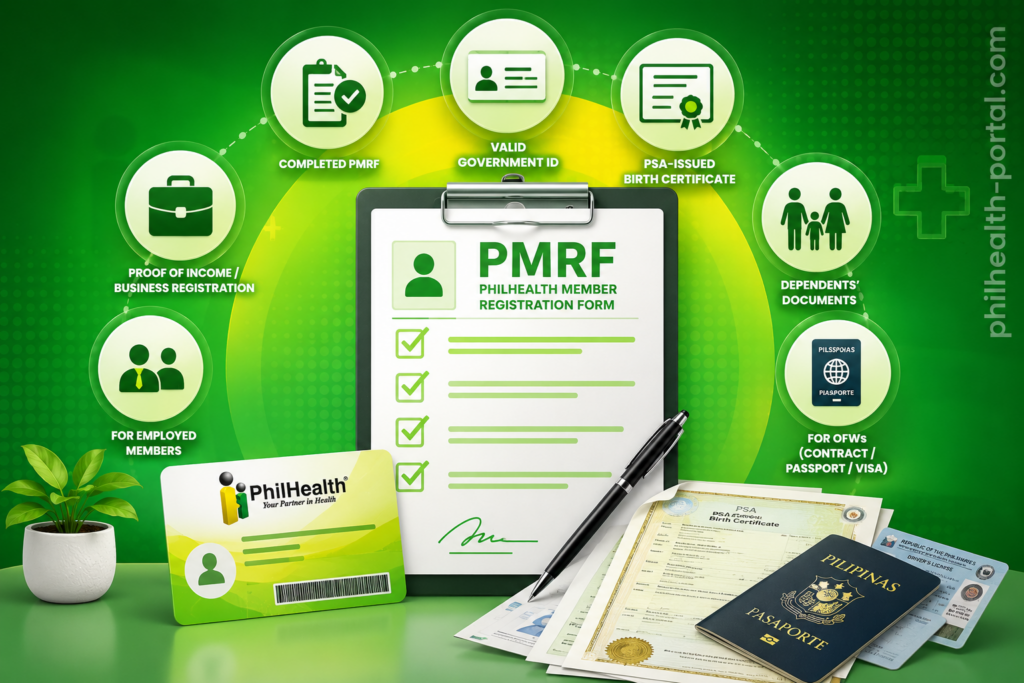
Requirements for new members vary slightly by category. Employed members usually only need to submit a PMRF to their HR department, since the employer handles the rest of the paperwork. Self-employed and voluntary members need proof of income, such as a Mayor’s Permit, DTI registration, or an Income Tax Return, while OFWs may be asked for a copy of their employment contract or passport with a valid visa stamp. Always double-check entries against your PSA birth certificate, because a mismatched name or birth date is one of the most common reasons registrations get delayed or rejected.
How to Register for PhilHealth (Online and Walk-In)
There are two main paths to becoming a PhilHealth member: registering online through the member portal, or visiting a branch in person. PhilHealth Employers also follow a separate process when enrolling new staff.
Online Registration for New Members
PhilHealth online registration lets self-employed individuals, voluntary members, and OFWs sign up without visiting a branch. This is the fastest route for most first-time applicants and works well if you already have your documents scanned and ready.
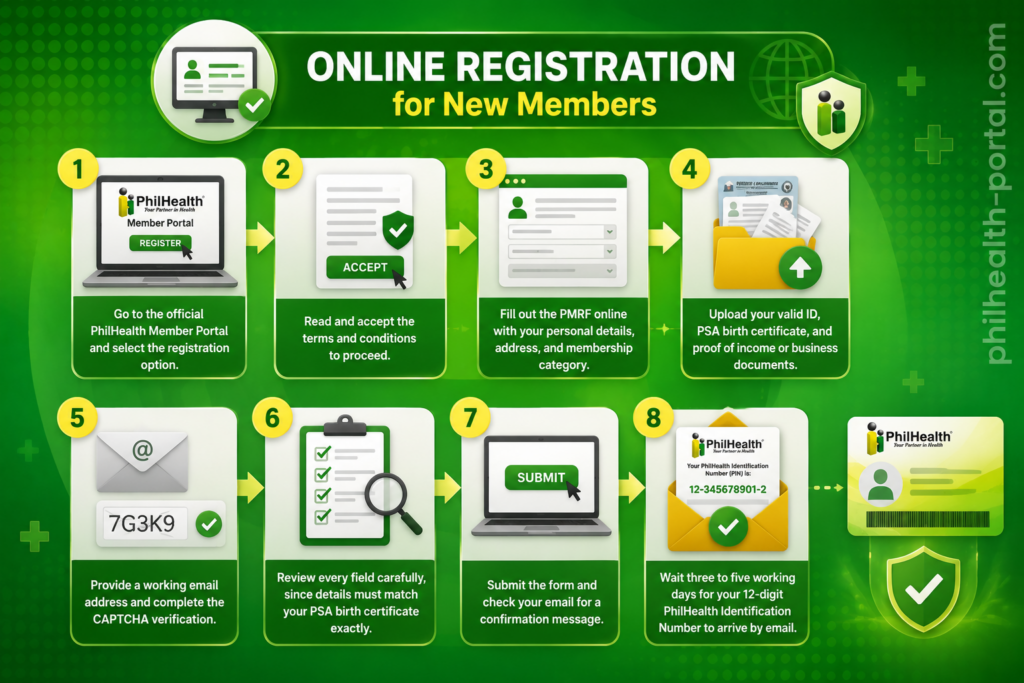
If your acknowledgment email does not arrive within a few minutes, check your spam folder before assuming something went wrong. The online system can also reject blurry scans or incomplete uploads without giving a clear explanation, so submit clear, well-lit photos or scans of every document.
Walk-In Registration
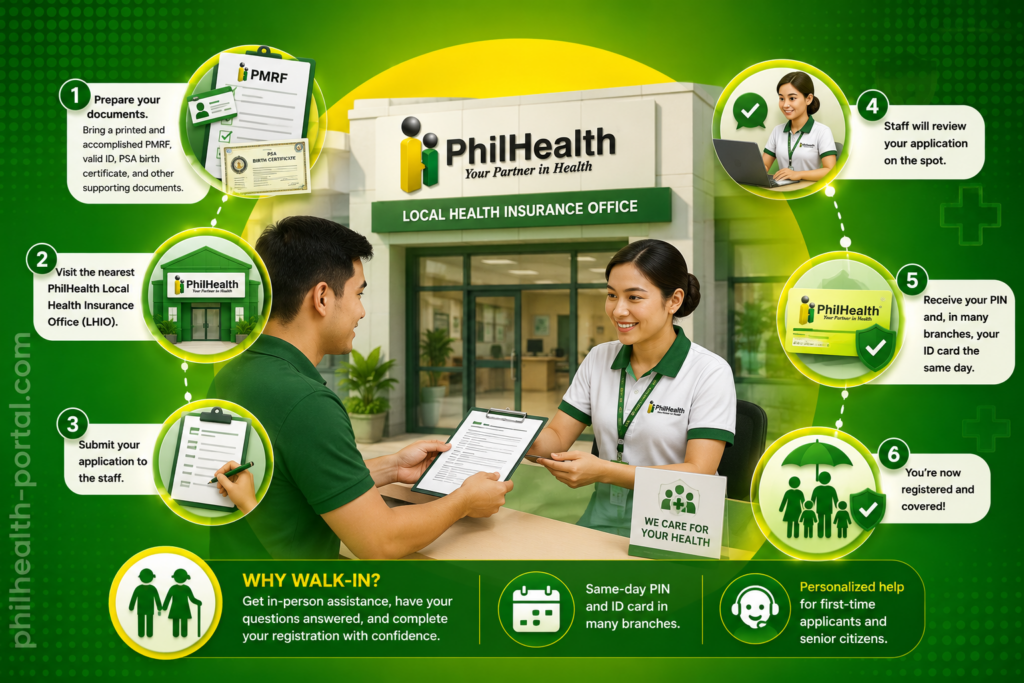
Walk-in registration remains useful if you prefer in-person assistance or your documents are not ready to scan. Bring a printed and accomplished PMRF along with your valid ID, PSA birth certificate, and supporting documents to the nearest PhilHealth Local Health Insurance Office (LHIO). Staff will review your application on the spot, and in many branches, you can receive your PIN and even your ID card the same day. This option works especially well for senior citizens or first-time applicants who want someone to walk them through the form.
Registering a New Employee (For Employers)
When an employer hires a new staff member, philhealth online registration for new employee enrollment generally works like this: if the employee already has a PIN, the employer simply adds them to the company’s list of remitted employees. If the employee has never registered before, the employer asks them to complete a PMRF, which gets submitted alongside the employer’s regular reports.
Employers themselves register their business first through ER1 (Employer Data Record) and ER2 (Employee List Report) forms, submitted with business documents such as DTI, SEC, CDA registration, or a Mayor’s Permit at the nearest LHIO. Many newly registered businesses now receive their PhilHealth Employer Number (PEN) automatically through the Central Business Portal during DTI or SEC registration, which removes a step that used to require a separate branch visit.
How to Find or Recover Your PhilHealth Number (PIN)
If you already registered before but forgot your PhilHealth number, you have several ways to recover it without starting a new application. Losing track of your PIN is common, especially among members who registered years ago and rarely log in.
eGovPH Super App
Download the app, verify your account using your Philippine National ID, and link your PhilHealth membership to view your PIN instantly.
PhilHealth Member Portal
Log in using your registered email address; your PIN appears on your dashboard once verified.
Action Center hotline
Call the PhilHealth Corporate Action Center and provide your full name and birth date for verification.
Email inquiry
Send your full name, birth date, and a copy of a valid ID to the official PhilHealth action center email address.
Walk-in assistance
Visit any PhilHealth LHIO with a valid ID; staff can look up your PIN directly in their system.
The eGovPH app is generally the fastest option since it pulls your PIN straight into your digital ID wallet once your account is verified. Walk-in assistance remains the most reliable choice if your registered email is no longer active or your contact details have changed significantly.
How to Log In to the PhilHealth Portal
PhilHealth maintains separate login systems for members, employers, and healthcare providers. Knowing which one applies to you avoids confusion when you sit down to log in.
Member Login
Employer Login (EPRS)
Employers manage company contributions through the Electronic Premium Remittance System, known as EPRS philhealth login. After activating EPRS access using a POAF (PhilHealth Online Account Facility) form at the LHIO, the employer logs in with their PhilHealth Employer Number (PEN) and assigned password to submit remittance reports, update employee lists, and generate payment references for the whole company.
Healthcare Provider Login (IHCP)
Accredited hospitals, clinics, and professionals use the Integrated Healthcare Provider portal to verify patient eligibility and submit claims. This login uses a PhilHealth Accreditation Number (PAN) together with a password, and many facilities also use a separate verification app for biometric checks before processing patient claims.
PhilHealth Contribution Table 2025–2026
Under the Universal Health Care Act, PhilHealth contributions are calculated as a percentage of a member’s monthly income, with the rate increasing gradually each year until it reached its ceiling. The premium rate has stayed at 5% since 2024 and continues unchanged through 2025 and 2026, with no further increase currently scheduled.
Employed Members
The total monthly premium for employed members is 5% of the monthly basic salary, split equally between employee and employer at 2.5% each. PhilHealth applies an income floor of ₱10,000 and a ceiling of ₱100,000, so contributions never fall below ₱500 or exceed ₱5,000 total per month.
| Monthly Basic Salary | Total Monthly Premium (5%) | Employee Share | Employer Share |
|---|---|---|---|
| ₱10,000 and below | ₱500.00 | ₱250.00 | ₱250.00 |
| ₱20,000 | ₱1,000.00 | ₱500.00 | ₱500.00 |
| ₱30,000 | ₱1,500.00 | ₱750.00 | ₱750.00 |
| ₱50,000 | ₱2,500.00 | ₱1,250.00 | ₱1,250.00 |
| ₱100,000 and above | ₱5,000.00 | ₱2,500.00 | ₱2,500.00 |
Self-Employed, Voluntary Members, and OFWs
Self-employed individuals, voluntary members, and OFWs shoulder the full 5% premium on their own, since there is no employer to share the cost. The same income floor and ceiling apply, meaning the minimum monthly contribution is ₱500 and the maximum is ₱5,000, based on declared monthly income. OFWs may choose to pay monthly, quarterly, semi-annually, or annually depending on what is more practical given their work schedule abroad.
Special Cases: Kasambahay, Seniors, and Indigents
Household employers covering a Kasambahay follow a different rule under the Kasambahay Law. If the household worker earns less than ₱5,000 a month, the employer shoulders the entire PhilHealth premium and cannot deduct any amount from the worker’s salary. If the Kasambahay earns ₱5,000 or more, the standard 50-50 split applies just like any other employed member. Senior citizens, identified indigents, sponsored members, and registered PWDs pay no premium at all, since their coverage is fully subsidized by the government.
How to Pay PhilHealth Contributions
Employers remit their employees’ contributions automatically through payroll and the EPRS system, so employed members generally do not need to pay anything themselves beyond the payroll deduction. Self-employed, voluntary, and OFW members, however, need to actively pay their own premiums, and the process changed significantly in 2026. You can either Pay Online or visit physical branches
Since April 1, 2026, PhilHealth has enforced a “No SPA, No Payment” policy for all self-paying members. Before making any payment, you must first generate a Statement of Premium Account (SPA) through the member portal or the dedicated SPA generator page. The SPA produces a QR-coded reference that locks in your exact coverage period and contribution amount, and payment channels like GCash, Maya, and partner banks will reject transactions that do not include a valid SPA reference.
Once you have your SPA, you can pay through any of the following channels:
Posting usually takes one to five working days depending on the channel used, so it helps to pay a few days ahead of your deadline rather than on the exact due date. Always screenshot or save your SPA and payment receipt until the transaction reflects in your contribution record.
How to Check Your Contribution and Print Your MDR
The Member Data Record, or MDR, is the official document hospitals and clinics use to confirm that your PhilHealth coverage is active. It shows your PIN, membership type, contribution history, and the names of your registered dependents, so keeping a current copy on hand is genuinely useful during emergencies.
To check your contributions and print your MDR online:
- Log in to the PhilHealth Member Portal using your PIN and password.
- Open the “Print MDR” or “Member Data Record” section of your dashboard.
- Review your latest contribution entries to confirm your employer or your own payments are posting correctly.
- Download the generated PDF.
- Print the document for hospital admission, claims, or other official use.
If your contributions appear missing or delayed, it is worth checking with your employer’s HR department first, since late employer remittance is one of the most frequent reasons records look incomplete even when deductions were made from your payroll.
How to Get Your PhilHealth ID Card
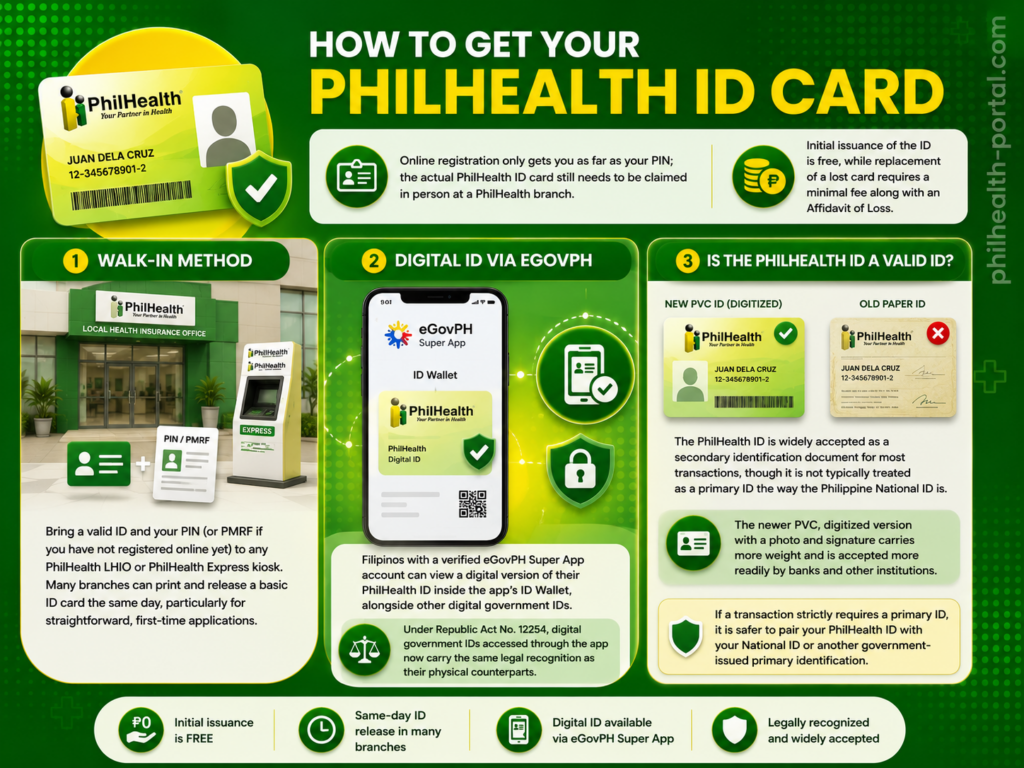
Online registration only gets you as far as your PIN; the actual philhealth id card still needs to be claimed in person at a PhilHealth branch. Initial issuance of the ID is free, while replacement of a lost card requires a minimal fee along with an Affidavit of Loss.
Walk-In Method
Bring a valid ID and your PIN (or PMRF if you have not registered online yet) to any PhilHealth LHIO or PhilHealth Express kiosk. Many branches can print and release a basic ID card the same day, particularly for straightforward, first-time applications.
Digital ID via eGovPH
Filipinos with a verified eGovPH Super App account can view a digital version of their PhilHealth ID inside the app’s ID Wallet, alongside other digital government IDs. Under Republic Act No. 12254, digital government IDs accessed through the app now carry the same legal recognition as their physical counterparts, which is useful if you need to present proof of membership while your physical card is still being processed.
Is the PhilHealth ID a Valid ID?
The PhilHealth ID is widely accepted as a secondary identification document for most transactions, though it is not typically treated as a primary ID the way the Philippine National ID is. The newer PVC, digitized version with a photo and signature carries more weight than the older paper card and is accepted more readily by banks and other institutions. If a transaction strictly requires a primary ID, it is safer to pair your PhilHealth ID with your National ID or another government-issued primary identification.
PhilHealth Benefits and Coverage
PhilHealth coverage spans both inpatient and outpatient care, with the goal of reducing what families pay during a hospital stay or medical emergency. Inpatient benefits use fixed case rates for common conditions and procedures, where PhilHealth pays a set amount directly to the hospital based on the diagnosis, with the patient responsible only for the remaining balance. For indigent, sponsored, and senior citizen members confined in basic or ward accommodation at government hospitals, the No Balance Billing policy removes out-of-pocket costs almost entirely.
Outpatient and primary care benefits are delivered through the YAKAP program, which replaced the older Konsulta package in mid-2025. YAKAP covers free consultations, selected laboratory and cancer screening tests, and a list of essential medicines worth up to ₱20,000 a year through the GAMOT benefit. Catastrophic and high-cost conditions, including certain cancers, kidney transplants, and complex cardiovascular procedures, fall under PhilHealth’s Z Benefits packages, which provide more substantial fixed-amount support given how expensive these treatments usually are. Maternity care, newborn screening, TB-DOTS treatment, dialysis sessions, and HIV/AIDS treatment packages round out the major coverage areas most members will encounter at some point.
PhilHealth YAKAP: Why a PIN Alone Is No Longer Enough
A PhilHealth PIN used to be sufficient to access outpatient benefits, but that changed with the rollout of YAKAP. To actually use free consultations, lab tests, and medicines under the program, every member now needs to complete an empanelment process at a chosen primary care clinic. This means selecting a YAKAP-accredited clinic through the member portal or the eGovPH app, signing the YES Empanelment Slip at that clinic, and completing what PhilHealth calls a First Patient Encounter, or FPE, before benefits activate. Without this step, a member can still be hospitalized and use inpatient coverage as before, but outpatient consultations, lab tests, and the GAMOT medicine credit will not be accessible. Completing empanelment is quick and free, so it is worth doing as soon as you register, rather than waiting until you actually need a consultation.
How to Update Your PhilHealth Information
Life changes such as marriage, a new child, a change of employer, or a change of address all require an update to your PhilHealth record. The process uses the same PMRF you used during registration, just marked differently.
Updating your dependents promptly matters more than many members realize, since a dependent who is not reflected on your MDR may not be covered when they actually need hospitalization.
Authorization Letter for PhilHealth Transactions
There are plenty of situations where a member cannot personally visit a PhilHealth office, whether due to illness, distance, or working abroad. An authorization letter for PhilHealth lets a trusted representative, such as a spouse, parent, sibling, adult child, or close friend, process transactions on the member’s behalf. Common uses include claiming an MDR, picking up a new or replacement ID, submitting registration or update documents, following up on a claim, and in some cases, making payments at a branch.
A valid authorization letter should include the member’s full name and PIN, the representative’s full name, a clear statement of what the representative is authorized to do, and the member’s signature. It does not need to be notarized, but it should be accompanied by a photocopy of the member’s valid ID and the representative’s own valid ID, both the original and a photocopy. Bringing all of these documents together, rather than just the letter alone, is what prevents delays at the counter.
Finding a PhilHealth Branch or Booking an Appointment
Many transactions, including ID claiming and certain registration concerns, still require a branch visit, so it helps to know how to find a PhilHealth LHIO near you. The official PhilHealth website lists branch locations and contact details by region under its “Offices” or “Contact Us” section, which is the most reliable way to confirm operating hours before heading out. Some regional offices and PhilHealth Express kiosks inside malls accept Online Appointment bookings through their website or social media pages, which can shorten your waiting time considerably compared to a walk-in queue. If a specific branch does not offer online booking, calling ahead or checking their official Facebook page for the latest queueing system is usually the next best option.
Common PhilHealth Problems and How to Fix Them
Even with the system mostly running online now, members regularly run into a handful of recurring issues. Here is how to resolve the most common ones.
PIN not found or application rejected
Double-check that your name, birth date, and other details match your PSA birth certificate exactly, since even a small discrepancy can cause an automatic rejection. If the online system keeps failing, try the walk-in route instead, where staff can manually review your documents.
Payment not reflecting in your record
Confirm that you used the correct, currently valid SPA reference number for the payment, since an expired or mismatched SPA is the most common cause of unposted contributions. If you paid through an employer, ask HR to confirm the remittance was submitted and check again after a few business days.
Forgot password or locked portal account
Use the “Forgot Password” link on the login page tied to your registered email, or contact the Action Center if your email is no longer accessible. Walk-in verification at an LHIO works as a last resort if online recovery fails.
Employer not remitting contributions
Print your MDR periodically to check whether your employer’s reported contributions match your payslip deductions. If there is a gap, raise it with HR first, and escalate to PhilHealth’s Action Center if the issue is not resolved, since unremitted contributions can affect your eligibility for benefits.
Expired or lost ID card
A lost card requires an Affidavit of Loss plus a minimal replacement fee, processed at any LHIO. An expired or damaged ID can usually be replaced for free or at a lower cost, depending on the branch’s current policy.
Tips to Manage Your PhilHealth Membership
A few simple habits go a long way toward avoiding the most common PhilHealth headaches. Generate a fresh SPA every time before paying as a self-employed or voluntary member, since reusing an old one is a common reason payments fail to post. Download the eGovPH app early so you always have quick access to your PIN and digital ID, even if your physical card is lost or still being processed. Print and keep an updated MDR at home, particularly if you have dependents, so you are not scrambling to retrieve it during a hospital admission. Complete your YAKAP empanelment as soon as you register rather than waiting, since outpatient benefits will not activate until that step is done. Finally, review your contribution history every few months if you are an employed member, just to confirm your employer’s remittances are posting correctly and on time.
Frequently Asked Questions
What is the PhilHealth Member Portal login?
The PhilHealth Member Portal is the official online platform where members log in using their 12-digit PIN and password to check contributions, print their MDR, generate an SPA for payment, and update personal details.
What is my username for PhilHealth login?
Your PhilHealth login username is your 12-digit PhilHealth Identification Number (PIN), not your name or email address.
How can I recover my PhilHealth PIN?
You can recover your PIN through the eGovPH app, by logging into the Member Portal with your registered email, by calling the PhilHealth Action Center, or by visiting any LHIO branch with a valid ID.
Who can register for or use the PhilHealth portal?
Employed members, self-employed individuals, voluntary members, OFWs, employers, and accredited healthcare providers can all register and use the portal, though each group has a separate login system.
How do I register for PhilHealth online?
Visit the official Member Portal, fill out the PMRF online, upload your valid ID and supporting documents, and submit the form; your 12-digit PIN typically arrives by email within three to five working days.
What is a PhilHealth MDR and how do I print it?
The MDR, or Member Data Record, is the official document showing your PIN, contribution history, and dependents; you can print it by logging into the Member Portal and selecting “Print MDR” from your dashboard.
What is PhilHealth YAKAP?
YAKAP is PhilHealth’s enhanced primary care program that replaced Konsulta in 2025, offering free consultations, selected lab tests, cancer screenings, and up to ₱20,000 in essential medicines per year once a member completes empanelment at an accredited clinic.
Can I have PhilHealth coverage without an employer?
Yes. Self-employed individuals, voluntary members, and OFWs can register and pay their own contributions directly, without needing an employer to sponsor their membership.
Is the PhilHealth ID a valid ID in the Philippines?
The PhilHealth ID is generally accepted as a secondary identification document, though it is not usually treated as a primary ID compared to the Philippine National ID.
How do employers access the PhilHealth system?
Employers register their business, receive a PhilHealth Employer Number (PEN), and log in to the Electronic Premium Remittance System (EPRS) to manage employee contributions and submit reports.
What can I do once I’m logged into the PhilHealth portal?
Once logged in, members can check contribution history, print their MDR, generate an SPA before paying, update personal information, and manage YAKAP clinic empanelment.
Do I need to pay PhilHealth contributions if I am unemployed?
If you are not covered as an indigent, senior citizen, or other subsidized category, you are expected to register and pay as a voluntary member to keep your coverage active.
Conclusion
PhilHealth membership touches almost every major life event in the Philippines, from starting a new job to welcoming a new baby to facing a medical emergency. Understanding how to register, recover your PIN, pay through the new SPA system, and complete your YAKAP empanelment makes the difference between a membership that simply exists on paper and one that actually protects your family when it matters. Keep your MDR updated, generate a fresh SPA before every self-paid contribution, and address any registration or payment issues early rather than waiting until you need to file a claim.