PhilHealth Online Appointment: How to Book, What to Bring & What to Expect (2026)
Slots fill up fast — knowing exactly how the system works means you get in without the guesswork or wasted trips. Follow the steps below to book your appointment, prepare your documents, and walk in ready.
Walking into a PhilHealth branch without an appointment can mean hours of waiting — sometimes only to be told to come back another day. The online appointment system was set up specifically to solve that problem, letting members schedule their visit in advance and arrive knowing their slot is confirmed. It is not complicated once you understand how the system works and which transactions actually require a booking.
This guide covers everything from booking your first appointment to handling common issues like full slots, missing confirmation emails, and fake appointment websites that have been circulating online.
What Is a PhilHealth Online Appointment?
A PhilHealth online appointment is a scheduled visit to a PhilHealth branch or Local Health Insurance Office (LHIO) that you book in advance through the official PhilHealth website or its regional appointment system. Instead of walking in and taking a number, you reserve a specific date and time for your transaction, which reduces your waiting time significantly and helps the branch manage foot traffic.
Not every PhilHealth transaction requires an appointment. The system is mainly used for transactions that involve in-person processing — things like PhilHealth ID applications, membership registration, and record updates. Some routine tasks like online contribution payments or checking your contributions can be done entirely through the Member Portal without visiting a branch at all. [Internal Link Opportunity: How to Pay PhilHealth Online]
Who Needs a PhilHealth Online Appointment?
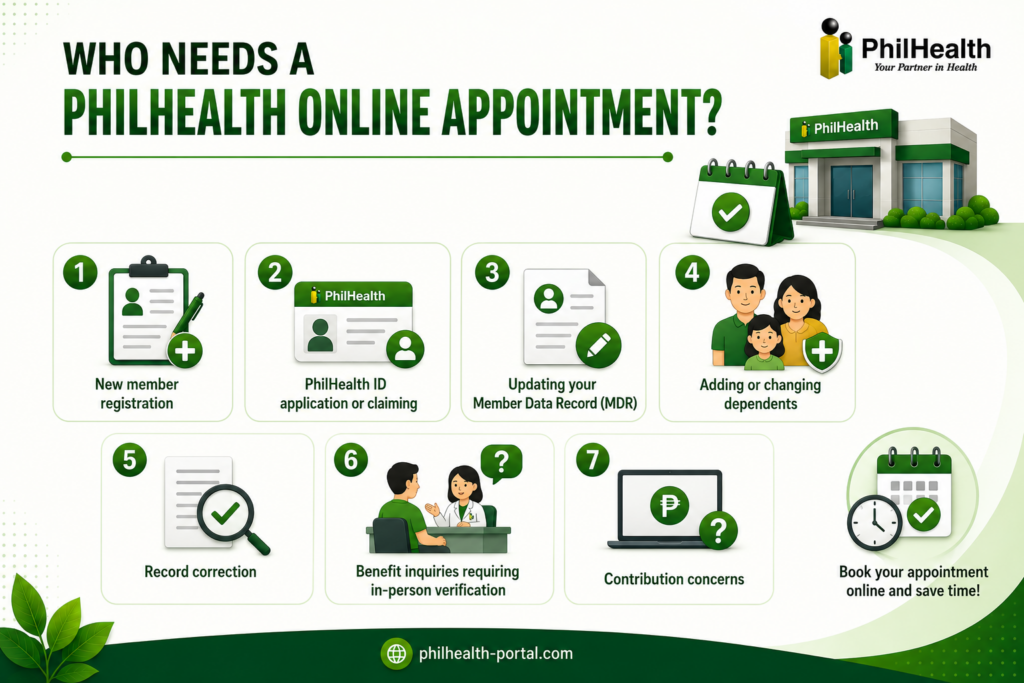
If you want to register, you can do your Registration Online. However, you likely need an appointment if you are visiting a PhilHealth branch for any of the following:
First-time applicants who need to register in person
Including those whose ID is ready for pickup
Name correction, civil status change, address update
Spouse, children, or qualified parents
Fixing errors in your contribution history or personal information
If someone want to inquire personally about his/her benefits.
The concerns that cannot be resolved through the portal
You generally do NOT need an appointment for:
If you are unsure whether your transaction requires a branch visit, check the PhilHealth Member Portal first at members.philhealth.gov.ph — many tasks can now be completed digitally without setting foot in an office.
Requirements Before Your PhilHealth Appointment
Arriving without complete documents is the number one reason members have to reschedule or make a second trip. Prepare these before your appointment date:
- Valid government-issued ID — at least one original with a photocopy (passport, driver’s license, UMID, SSS ID, voter’s ID, or postal ID)
- PhilHealth Identification Number (PIN) — your 12-digit membership number
- Appointment confirmation — printed or saved on your phone (screenshot works)
- Relevant forms or supporting documents — depending on your specific transaction (e.g., PSA birth certificate for dependent enrollment, marriage certificate for civil status update)
- Extra photocopies of all documents — some branches require multiple copies
For first-time registrants, you will also need a filled-out PhilHealth Membership Registration Form (PMRF), which can be downloaded from the official PhilHealth website before your visit.
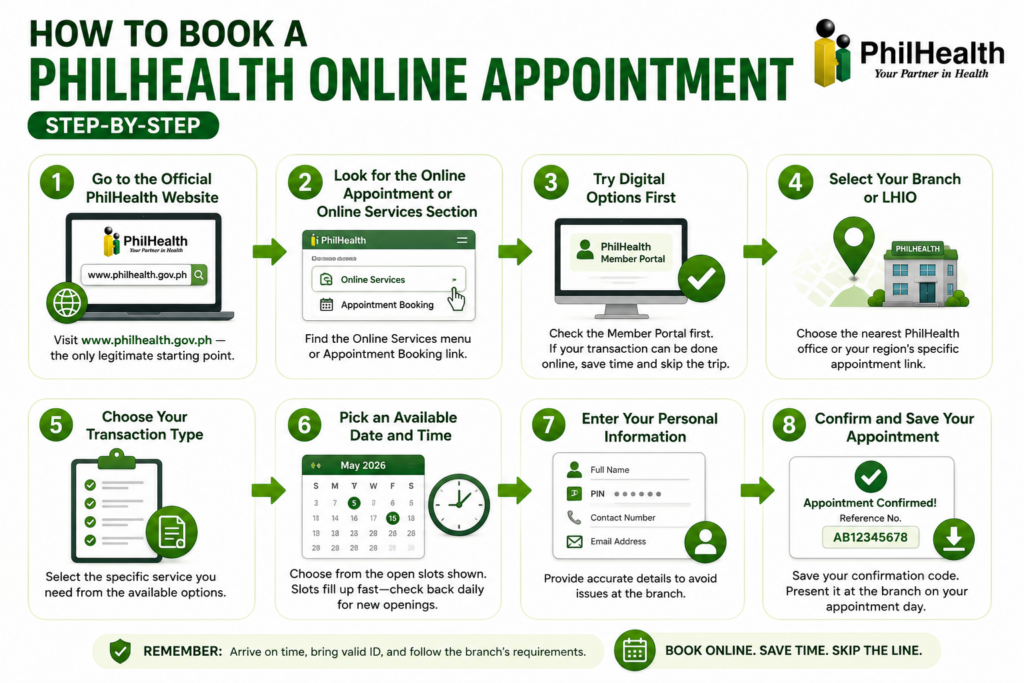
How to Book a PhilHealth Online Appointment (Step-by-Step)
The booking process varies slightly depending on your region and which branch you are visiting, but the general flow is the same across all PhilHealth offices.
How to Reschedule or Cancel a PhilHealth Appointment
If something comes up and you cannot make your scheduled appointment, cancel it as early as possible so the slot opens up for another member. The cancellation or rescheduling option is usually available through the same portal where you booked, using your confirmation reference number.
Repeated no-shows without cancellation may affect your ability to book future appointments at that branch. If you cannot find the cancellation link, call the PhilHealth branch directly using the contact numbers listed on the official PhilHealth website.
PhilHealth Online Appointment vs Walk-In
| Trait | Online Appointment | Walk-In |
|---|---|---|
| Waiting time | Shorter — slot is reserved | Unpredictable — can be hours |
| Slot availability | Must be available online | First come, first served |
| Best for | Planned transactions | Urgent or simple matters |
| Risk | Slot may fill up fast | Branch may stop accepting walk-ins |
| Preparation | Book in advance | Just arrive early |
For most transactions, booking online is the smarter move. Walk-in visits still work at many branches, but some LHIOs have shifted to appointment-only for certain services — especially since the post-pandemic period when queuing systems were overhauled.
Services You Can Handle at Your Appointment
When you arrive for your scheduled visit, the PhilHealth staff can assist you with:
- Membership registration for first-time members
- PhilHealth ID application and claiming of ready IDs
- MDR requests and updates — including printing your current MDR [Internal Link Opportunity: PhilHealth MDR Guide]
- Adding or updating dependents on your membership record
- Contribution record correction — for missing or misposted payments
- Benefit inquiries requiring manual verification
- Voluntary member registration — for self-employed, freelancers, and OFWs registering independently
Common Problems During PhilHealth Online Appointment Booking
Tips for a Smooth PhilHealth Appointment
PhilHealth Contact Information
If you run into issues that cannot be resolved online, reach PhilHealth through these official channels:
- PhilHealth Hotline: 8441-7444
- Official Website: www.philhealth.gov.ph
- Email: inquiry@philhealth.gov.ph
- Facebook Page: PhilHealth Official (verify it has the blue checkmark)
Avoid asking for help in unofficial Facebook groups or third-party pages — misinformation about PhilHealth appointments is widespread on social media.
Frequently Asked Questions
Can I book a PhilHealth appointment online?
Yes. PhilHealth allows members to schedule branch visits through its online appointment system. Go to the official PhilHealth website at www.philhealth.gov.ph, look under Online Services, and follow the booking steps for your region and branch.
Is a PhilHealth online appointment required for all transactions?
No. Many transactions — including paying contributions, checking your records, and generating your SPA — can be done entirely through the PhilHealth Member Portal without visiting a branch. Appointments are mainly needed for in-person services like ID applications, dependent enrollment, and record corrections.
What should I bring to my PhilHealth appointment?
Bring your PhilHealth PIN, at least one valid government-issued ID (original and photocopy), your appointment confirmation code, and any supporting documents relevant to your transaction. Extra photocopies are always a good idea.
Can I apply for a PhilHealth ID through an online appointment?
Yes. PhilHealth ID applications can be scheduled through the online appointment system. You will fill out the PMRF at the branch or submit a pre-filled copy, and your ID will be processed after your visit.
What happens if I miss my PhilHealth appointment?
Your slot will typically be forfeited. You will need to book a new appointment. If you know in advance that you cannot make it, cancel your slot through the portal or by calling the branch so another member can use it.
Can voluntary members use the PhilHealth online appointment system?
Yes. Voluntary members, self-employed individuals, OFWs, and freelancers can all use the appointment system, especially when registering as voluntary members for the first time or updating their contribution records in person.
How do I book a PhilHealth appointment in Dumaguete or other regional branches?
Visit www.philhealth.gov.ph and look for the regional appointment link for your area. Some provinces and cities use separate booking portals that are accessible through the main PhilHealth website’s Online Services section.